30 AI Prompts for Spreadsheets to Automate Data Analysis Save Time
Spreadsheets are everywhere, from business reports and financial tracking to project planning and everyday organization. But turning raw rows of data into meaningful insights can often feel time-consuming and complicated. The rise of AI-powered tools has changed how people approach spreadsheet work, making it easier to automate repetitive tasks, analyze information, and create better reports.
The right AI prompts can help spreadsheet users move beyond basic data entry and unlock smarter workflows. Whether you work with Excel, Google Sheets, or other spreadsheet platforms, using clear prompts can help you clean datasets, discover trends, generate formulas, and improve decision-making.
Key Takeaways
- AI prompts can simplify spreadsheet analysis and automation tasks.
- Clear instructions help generate better formulas, reports, and insights.
- AI can assist with cleaning, organizing, and understanding complex datasets.
- Spreadsheet workflows become faster when repetitive tasks are automated.
- Anyone can use AI prompts to improve productivity with data.
How AI Prompts Are Transforming Spreadsheet Work
Traditional spreadsheet tasks often require manual effort. Users spend hours checking errors, formatting information, building formulas, and creating charts. While spreadsheets remain powerful tools, many people struggle to get the most value from their data because they lack time or advanced technical knowledge.
AI prompts provide a simple way to communicate what you need from your spreadsheet data. Instead of manually searching for formulas or creating complicated workflows, users can describe their goal and receive guidance, suggestions, or automated solutions.
Important: The quality of your results depends on the quality of your instructions. A clear prompt that explains your data, goal, and preferred outcome helps create more accurate spreadsheet solutions.
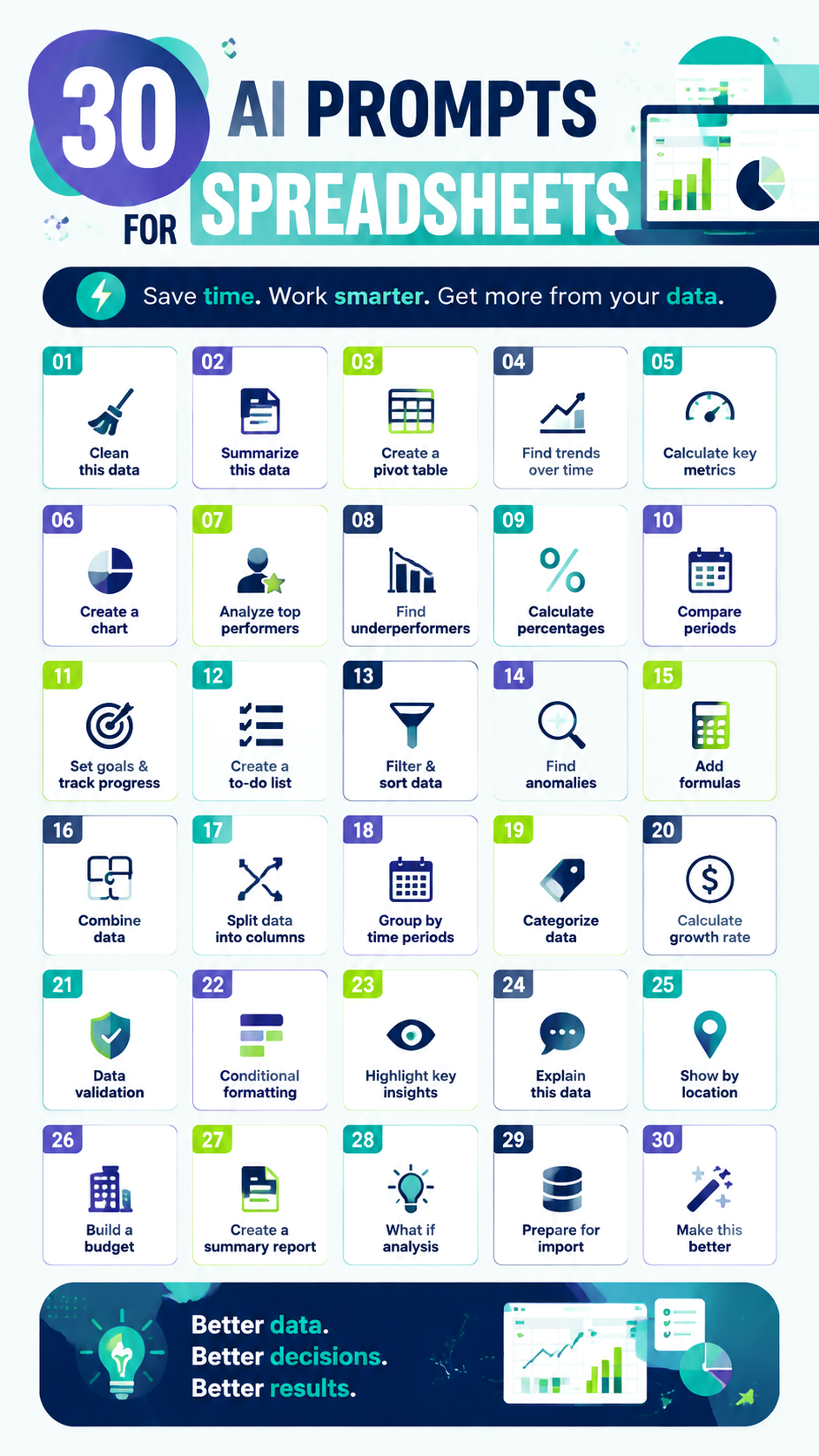
30 Useful AI Prompts for Spreadsheets
The following spreadsheet AI prompts cover common tasks that professionals, students, entrepreneurs, and data analysts perform regularly. They can help you save time and improve the way you work with information.
Data Cleaning and Organization Prompts
Messy data can create inaccurate results. AI can help identify problems and suggest ways to organize information properly.
- Clean this data: Remove duplicates, fix errors, and standardize formats.
- Summarize this data: Provide key trends and important insights.
- Categorize this information: Group similar items into logical categories.
- Find missing values: Identify incomplete fields and suggest solutions.
- Standardize these entries: Make names, dates, and formats consistent.
Analysis and Reporting Prompts
One of the biggest advantages of AI spreadsheet prompts is the ability to quickly analyze information and discover patterns.
- Create a pivot table showing sales by category or region.
- Find trends over time and explain seasonal patterns.
- Calculate key metrics including averages, totals, and growth rates.
- Identify the highest and lowest performing areas.
- Create a summary report based on this dataset.
- Explain this spreadsheet in simple terms.
Formula and Automation Prompts
Formulas are one of the most powerful spreadsheet features, but they can also be confusing. AI can help users create and understand formulas faster.
- Create a formula to calculate percentages.
- Find the correct formula for comparing two values.
- Explain what this spreadsheet formula does.
- Automate repetitive calculations in this worksheet.
- Suggest formulas to improve this spreadsheet.
Ways to Use AI Prompts in Excel and Google Sheets
AI spreadsheet prompts are useful across many different industries and personal projects. They are not limited to advanced analysts. Anyone working with information can benefit from faster organization and better insights.
Business and Marketing Data
Businesses can use AI prompts to understand customer behavior, monitor sales performance, and create better reports. For example, a marketing team can analyze campaign results, compare monthly performance, and identify opportunities for improvement.
Finance and Budget Planning
AI can support budgeting tasks by helping users organize expenses, calculate financial metrics, and create tracking templates. Simple prompts can turn a basic spreadsheet into a more useful planning tool.
Project Management
Project managers can use AI prompts to create task lists, track progress, summarize updates, and identify possible delays. This makes spreadsheet-based planning more efficient and easier to maintain.
Why This Matters
AI prompts make spreadsheet skills more accessible. You do not need to memorize every function or spend hours searching for solutions. With the right instructions, you can:
- Reduce repetitive manual work.
- Understand your data more clearly.
- Create professional reports faster.
Tips for Creating Better Spreadsheet AI Prompts
Writing effective prompts is a skill that improves with practice. The more specific your request, the better the response will be.
- Describe the type of data you are working with.
- Explain the goal you want to achieve.
- Include examples when possible.
- Ask for step-by-step instructions if you need guidance.
- Request explanations to better understand the results.
A strong prompt might explain the purpose of the spreadsheet, the columns included, and the type of analysis required. This gives AI enough context to provide practical recommendations.
AI Spreadsheet Skills for the Future
As data continues to play a bigger role in everyday decisions, spreadsheet skills are becoming more valuable. Combining traditional spreadsheet knowledge with AI-powered assistance creates a faster and smarter workflow.
Learning how to use AI prompts does not replace spreadsheet expertise. Instead, it helps users work more efficiently by handling repetitive tasks and providing new ways to explore information.
At a Glance
- Use AI prompts to automate spreadsheet tasks.
- Improve data cleaning and analysis workflows.
- Create better reports with less manual effort.
- Make spreadsheet decisions based on clearer insights.
Conclusion: Make Your Spreadsheet Workflow Smarter
AI prompts for spreadsheets offer a practical way to save time, improve accuracy, and discover valuable insights from your data. Whether you are managing business information, tracking personal goals, or analyzing reports, the right prompts can make spreadsheet work easier and more productive.
Start experimenting with simple requests, refine your prompts, and build a workflow that matches your needs. With better instructions and smarter tools, spreadsheets can become more than just tables of information. They can become powerful resources for better decisions.
Tags
AI Spreadsheet Prompts
Excel Automation
Google Sheets Tips
Data Analysis
Spreadsheet Productivity
AI Tools